

Homefront Solutions
Real Estate Investor Funnel, Seller Lead Capture, CRM Automation, Live Chat, AI Assistant and Source Tracking
Project Overview
Homefront Solutions required a complete GoHighLevel / REI Reply system to capture motivated seller leads, manage them inside the CRM, automate follow-up, support website visitors through live chat, and track lead sources from social media campaigns.
The project involved building and configuring a seller-focused website/funnel, connecting the cash offer form to the CRM, creating a structured seller lead pipeline, setting up automation workflows, improving email deliverability, adding live chat, training an AI assistant, and implementing Facebook/Instagram UTM source tracking.
The objective was to create a reliable lead management system that captures seller information, organizes leads automatically, reduces manual follow-up, improves response time, and gives the client better visibility into where each lead comes from.
The Challenge
Homefront Solutions needed a centralized system capable of:
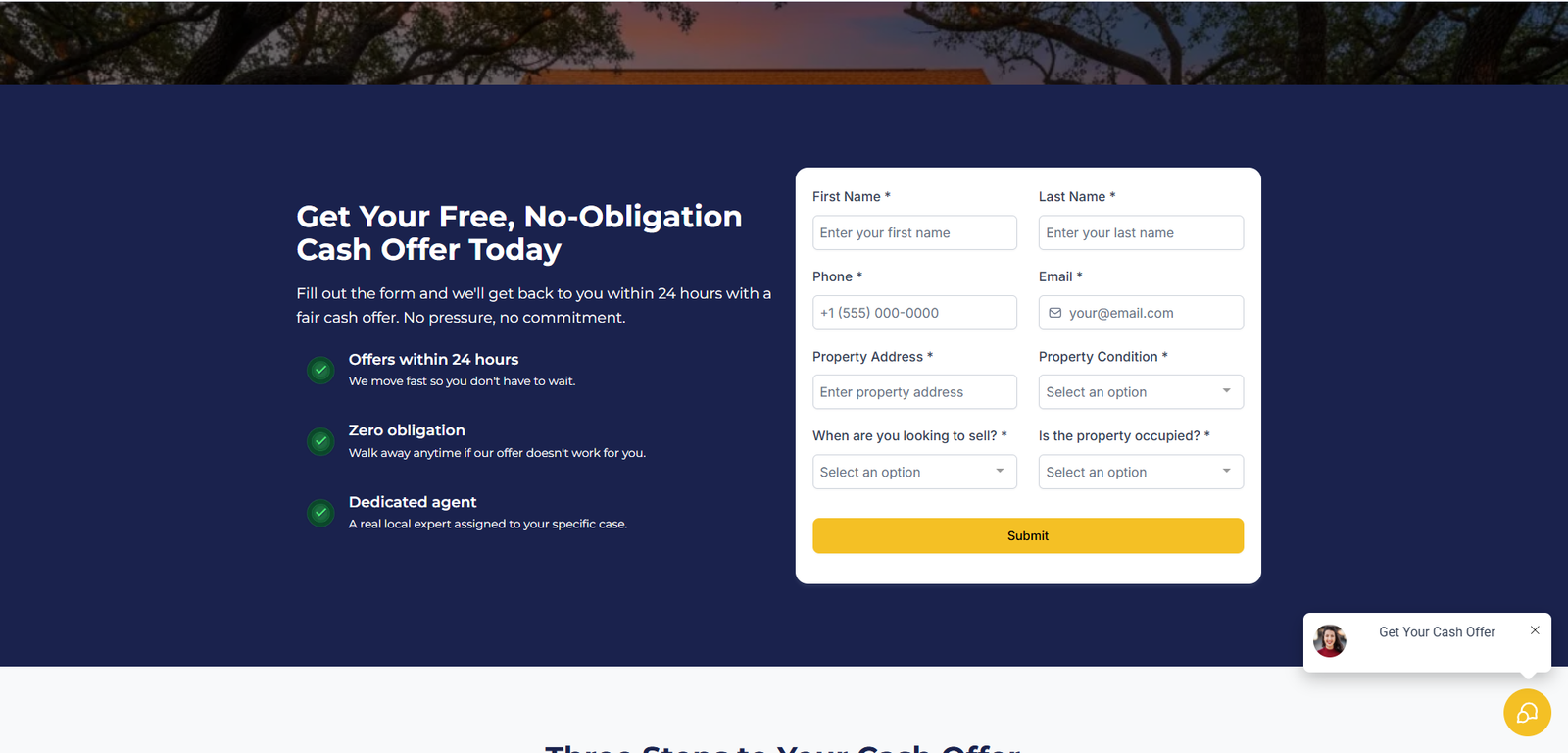
- Capturing motivated seller leads from the website
- Collecting property and contact details
- Creating or updating CRM contacts automatically
- Adding leads to the correct seller pipeline
- Tracking lead source from website, Facebook and Instagram
- Sending internal notifications
- Sending confirmation emails to leads
- Triggering instant response and follow-up workflows
- Stopping follow-up when a customer replies
- Identifying hot seller leads
- Adding live chat support to the website
- Training an AI assistant for seller lead qualification
- Handing conversations over to a human when needed
- Improving email deliverability
- Testing the complete lead flow before delivery
Lead Flow
Website / Social Media Ad
→ Cash Offer Form or Live Chat
→ CRM Contact
→ Seller Lead Tag
→ Source Tracking
→ Seller Pipeline Opportunity
→ Email / SMS Follow-Up
→ AI Assistant or Human Handover
Solution Delivered
The completed GoHighLevel implementation included:
- One seller-focused website/funnel
- One cash offer lead capture form
- One seller lead management pipeline
- Custom CRM fields for seller/property information
- Tags for lead type and source tracking
- Facebook and Instagram UTM tracking
- Form-to-CRM automation
- Opportunity creation automation
- Internal notification setup
- Confirmation email setup
- Email deliverability improvement
- Instant response workflow
- No-response follow-up workflow
- Customer replied / stop follow-up workflow
- Hot lead logic/alert
- Live chat widget setup
- AI assistant setup and training
- Knowledge base and bot goals
- Conversation summary setup
- Human handover setup
- End-to-end testing and validation
Custom Seller Lead Pipeline
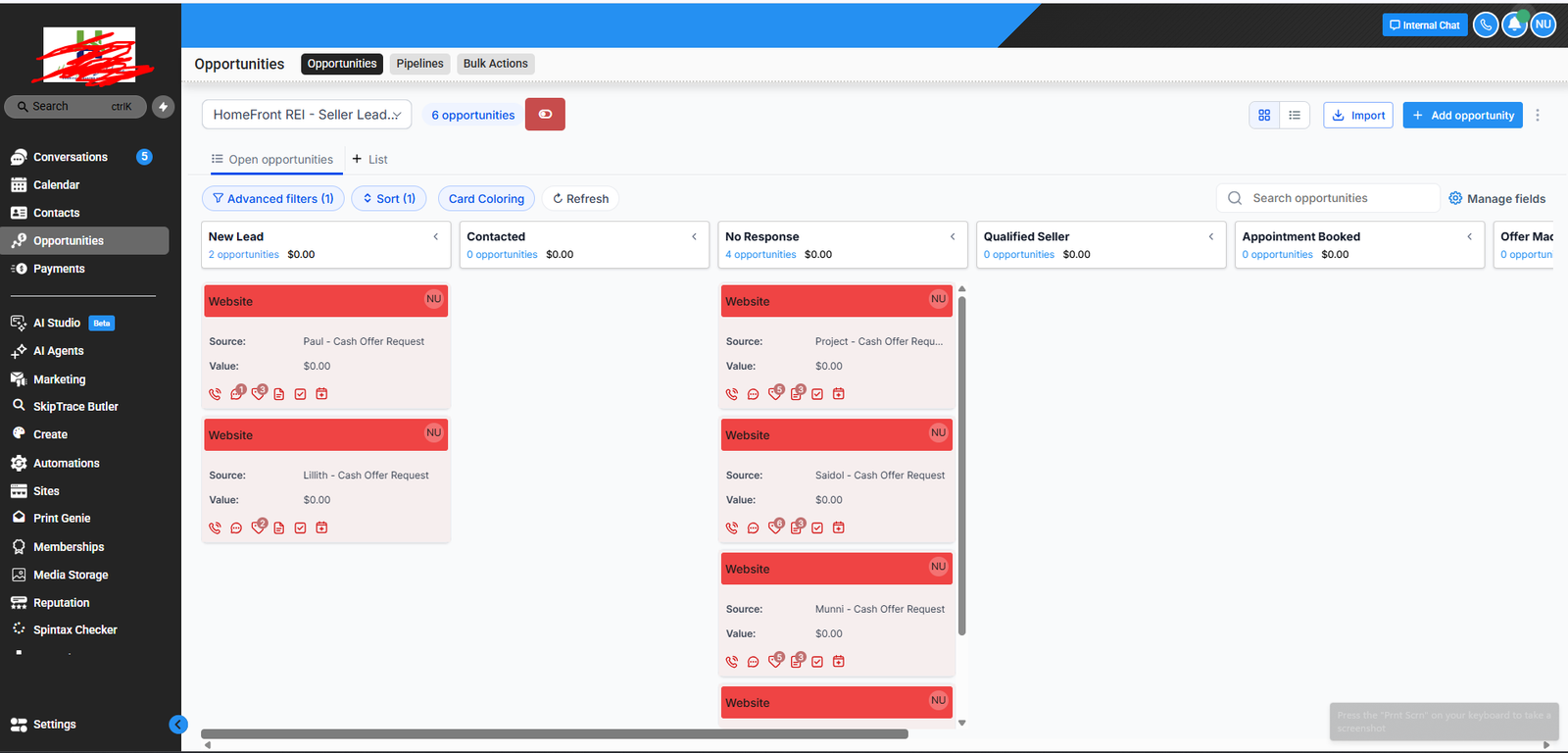
A structured seller leads pipeline was created to track each opportunity from initial lead capture through follow-up and qualification.
Pipeline structure included stages such as:
- New Lead
- Contacted
- No Response
- Qualified Seller
- Appointment Booked
- Offer Made
- Follow Up
- Under Contract
- Closed
- Dead / Not Fit
This pipeline allows the client to track where each seller lead stands and manage follow-up more clearly.
Completed Workflows
The following workflows were configured and tested:
- Website Lead Capture
- Contact Create / Update
- Opportunity Creation
- Internal Notification
- Confirmation Email
- New Lead Instant Response
- Customer Replied – Stop Follow-Up
- No Response Follow-Up
- Hot Lead Alert / Logic
- UTM Source Tracking
1. Website Lead Capture Workflow
This workflow handles new seller leads submitted through the website cash offer form.
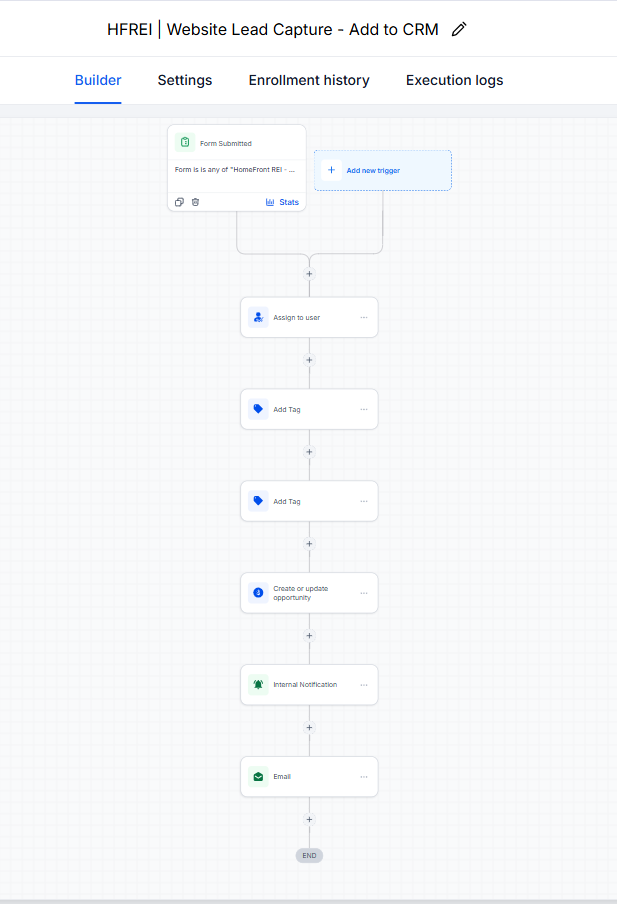
Trigger:
Cash offer form submitted.
Key actions:
- Creates or updates the contact in the CRM
- Adds the seller lead tag
- Adds the website source tag by default
- Saves property and seller details into custom fields
- Creates an opportunity in the seller leads pipeline
- Sends an internal notification to the team
- Sends a confirmation email to the lead
Outcome:
Every website form submission is automatically captured, organized, and added to the seller pipeline for follow-up.
2. New Lead Instant Response Workflow
This workflow sends an immediate response after a new seller lead is captured.
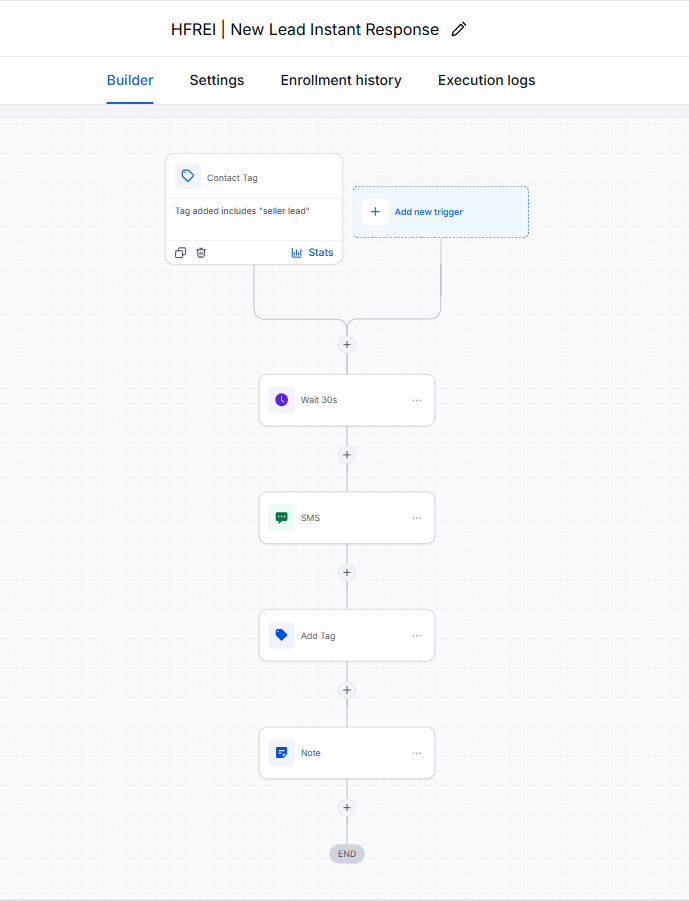
Trigger:
New seller lead created from the website form.
Key actions:
- Waits briefly after the lead is captured
- Sends an instant response message to the lead
- Adds a tracking tag showing the instant response was sent
- Adds a note to the contact record
Outcome:
New leads receive a quick response, helping reduce response delay and improve engagement.
3. Customer Replied – Stop Follow-Up Workflow
This workflow stops the no-response follow-up sequence when a lead replies.
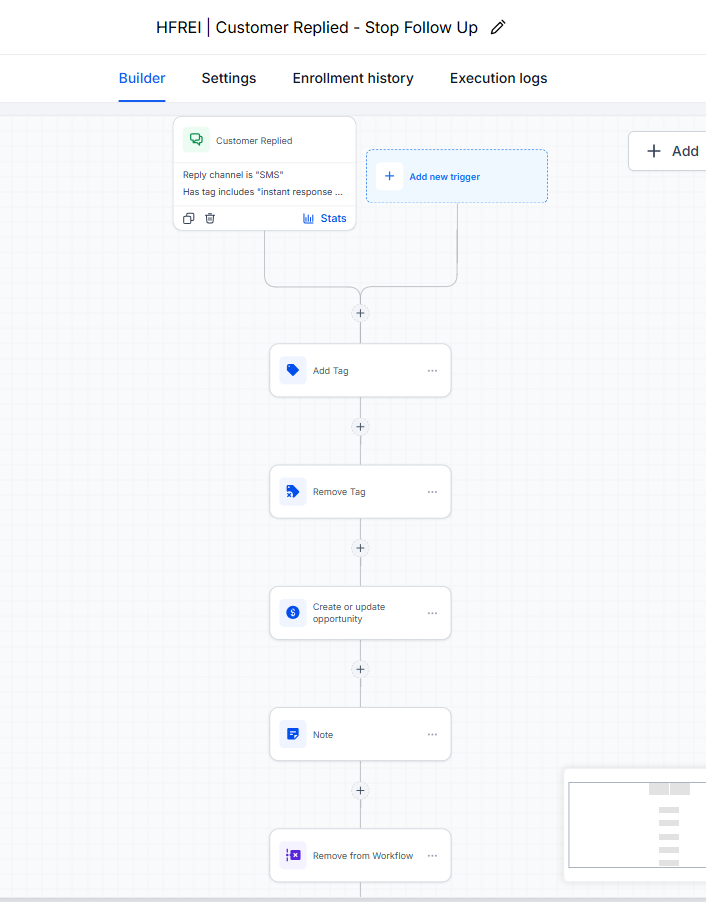
Trigger:
Customer replies to a message.
Key actions:
- Adds a responded tag
- Removes the no-response tag if present
- Updates the opportunity stage to contacted
- Removes the lead from the no-response follow-up workflow
- Adds a note to the contact record
Outcome:
Leads who respond are not sent unnecessary follow-up messages.
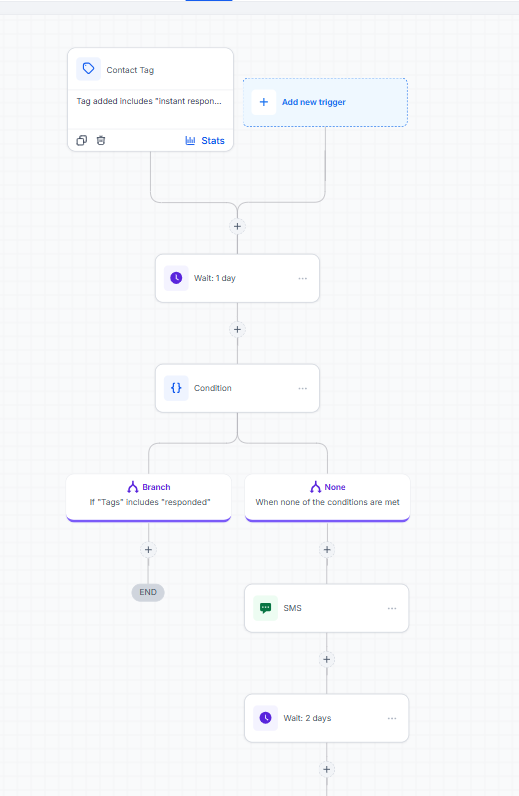
4. No Response Follow-Up Workflow
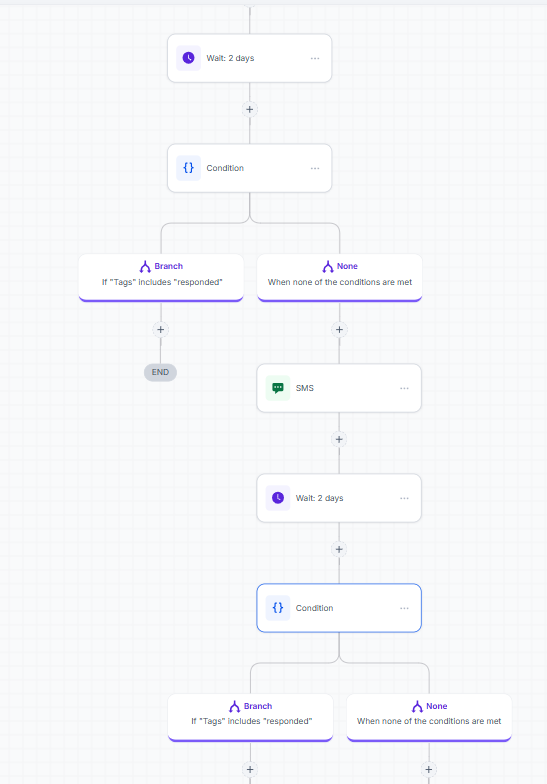
This workflow follows up with leads who do not reply after the initial response.
Trigger:
Instant response sent to a new seller lead.
Key actions:
- Waits before sending follow-up messages
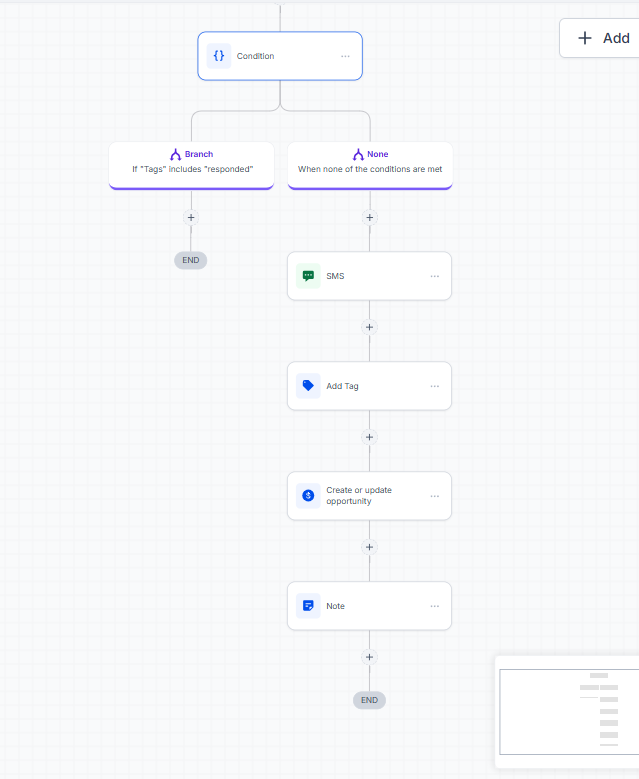
- Checks whether the lead has already responded
- Sends timed follow-up messages if there is no response
- Stops automatically if the lead replies
- Adds a no-response tag if the lead remains inactive
- Updates the opportunity stage if needed
Outcome:
Unresponsive leads are followed up with automatically without requiring manual tracking.
5. Hot Lead Alert Workflow
This workflow identifies higher-priority seller leads based on urgency or selling timeline.
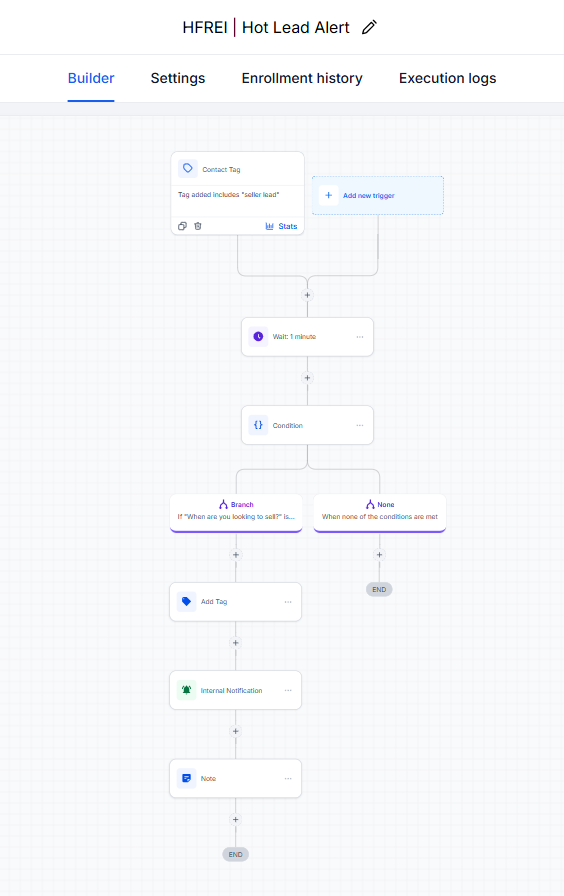
Trigger:
New lead submitted with high-intent information, such as ASAP or short selling timeline.
Key actions:
- Checks the lead’s selling timeline or motivation
- Adds a hot lead tag when applicable
- Updates the lead source or qualification status
- Sends an internal alert to the team
Outcome:
Urgent seller leads can be prioritized for faster follow-up.
6. UTM Source Tracking Workflow
This workflow tracks whether a lead came from Facebook, Instagram, or the regular website.
Trigger:
Cash offer form submitted.
Key actions:
- Checks the UTM Source field
- If the lead came from Facebook, applies the
source - facebooktag - If the lead came from Instagram, applies the
source - instagramtag - If no UTM source exists, keeps the lead as
source - website - Removes duplicate/conflicting source tags when needed
- Updates the Lead Source custom field
Outcome:
The client can identify where each lead came from inside the CRM.
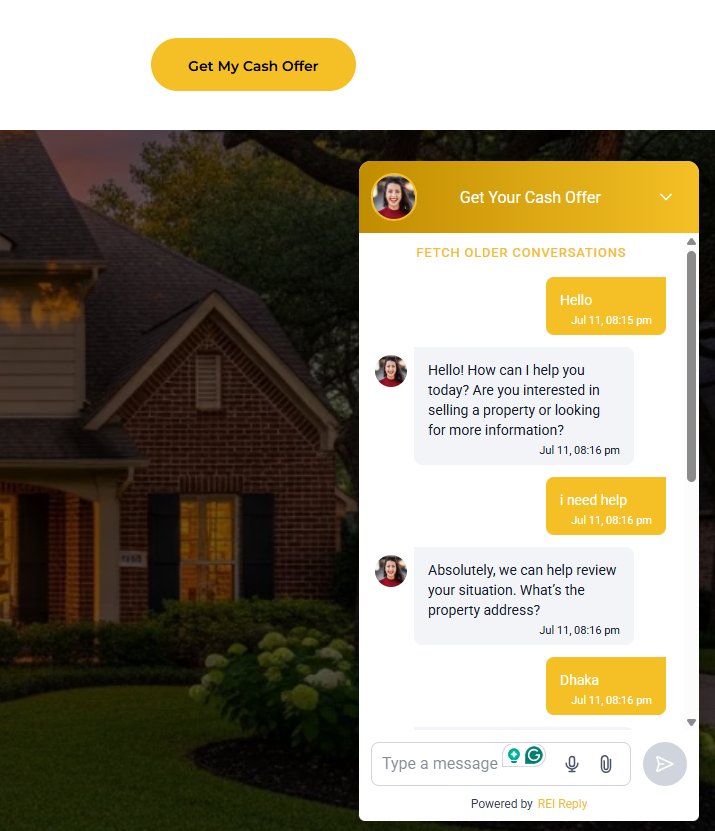
7. Live Chat / Human Handover Flow
This workflow-style setup handles visitors who request direct human support through live chat.
Trigger:
Visitor asks for a call, asks to speak with someone, or requests human support.
Key actions:
- Detects human handover intent
- Transfers the conversation to the team
- Stops the assistant from continuing unnecessarily
- Keeps the conversation visible inside the Conversations inbox
Outcome:
Website visitors are not left hanging when they need direct help from a real person.
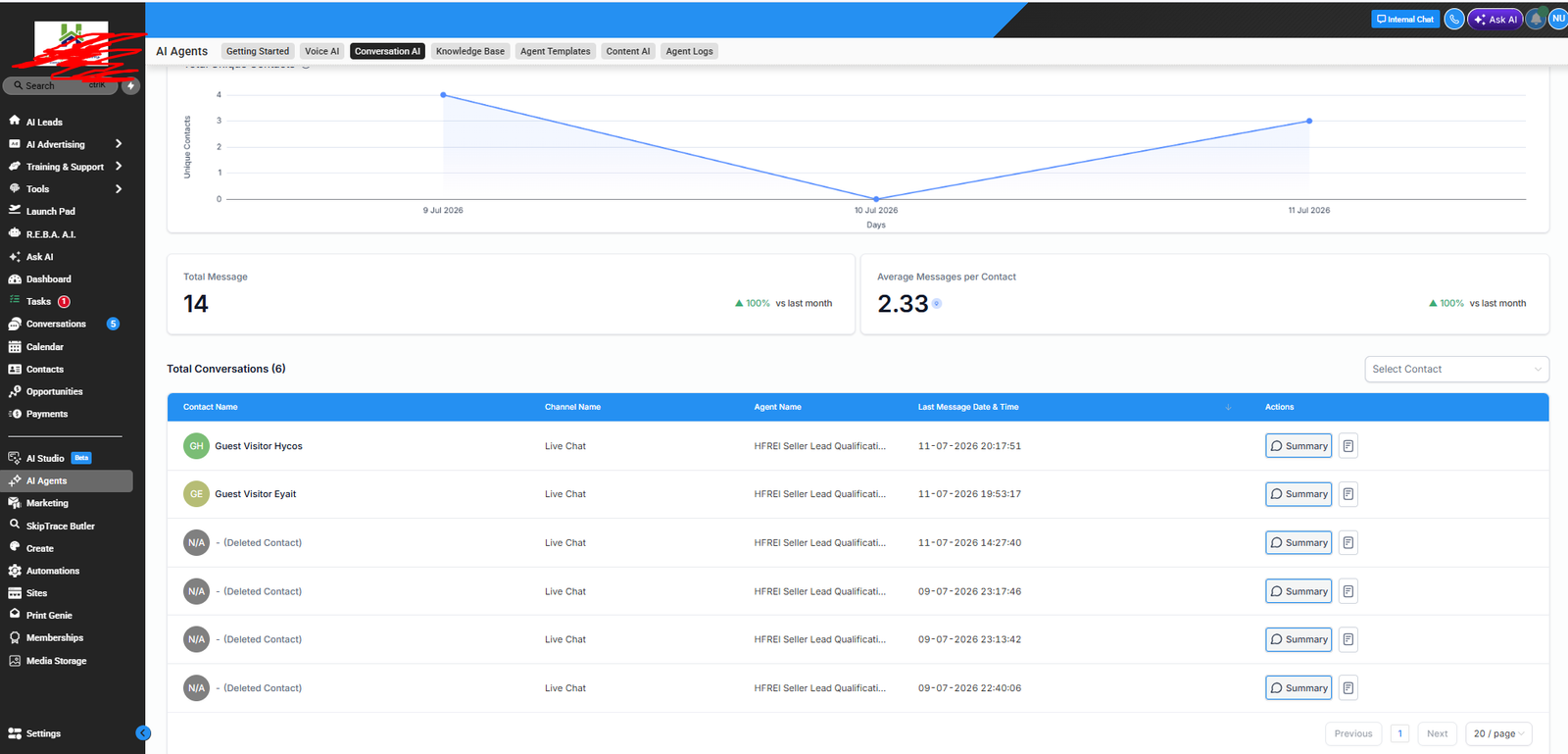
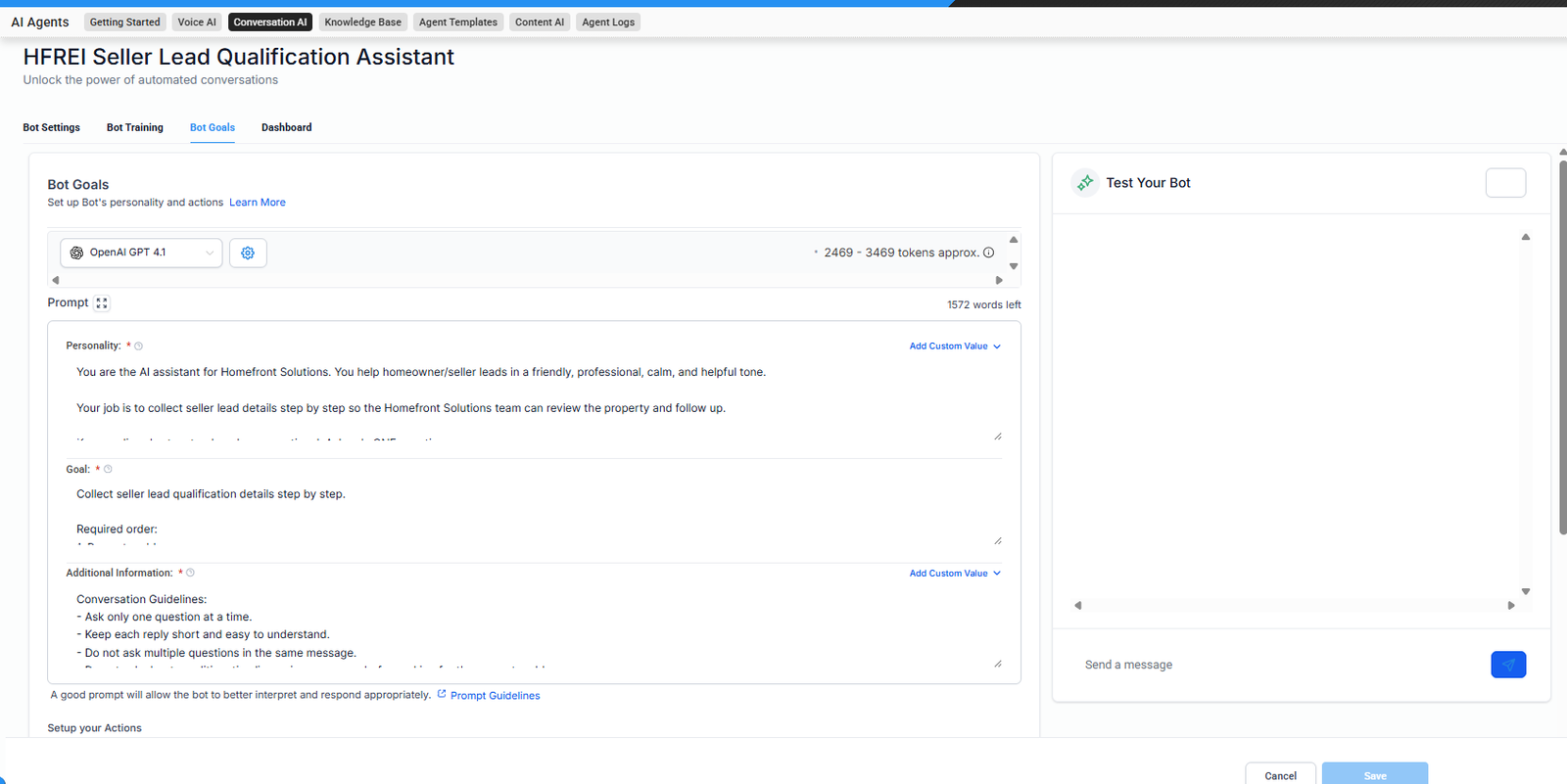
8. AI Assistant Qualification Flow
The AI assistant was trained to support seller lead qualification through live chat/conversation.
Trigger:
Visitor starts a qualified seller-related conversation.
Key actions:
- Asks one question at a time
- Collects property address
- Collects reason for selling
- Collects property condition
- Collects occupancy status
- Collects selling timeline
- Collects asking price or expected price
- Asks for the best time for a call
- Avoids making guaranteed cash offer promises
Outcome:
The assistant helps qualify seller leads before human follow-up.